 GiMeSpace VRAM Drive is a much better alternative to the infamous GpuRamDrive project.
First of all this program is much faster than GpuRamDrive, but more important this program caches reads and writes so it doesn’t have to wake up the GPU all the time. GpuRamDrive tends to overheat your GPU causing battery drain on laptops. GiMeSpace VRAM Drive doesn't have this problem.
GiMeSpace VRAM Drive is a great alternative to traditional RAM Disks because it doesn’t use much RAM, instead it uses the VRAM of your dedicated graphics card. This is great because RAM is very expensive these days but often your VRAM is not used unless you are gaming, video editing or doing heavy computing tasks.
Just make sure you have a dedicated GPU, if you have only an integrated GPU (that uses normal RAM) then this program is of no use to you.
Download GiMeSpace VRAM Drive 1.0.2 and try for maximum 30 days for free without paying:

Buy now for only 40AUD (~25USD)
How to use this program:
It is recommended to start this program at windows start up. You can select this during the installation.
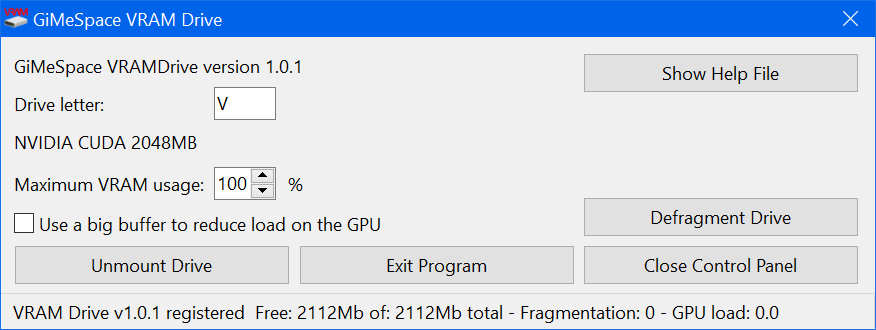
Standard it uses drive letter V but you can assign any drive letter you want. Just make sure you unmount and mount again the drive after changing the drive letter.
You can select the percentage of VRAM that is used by this program. You need to restart the program if you change this.
You can select the option to use a bigger buffer for read/write caching, this is useful to release the load on the GPU. Doubling the buffer from 128 Mb to 256 Mb causing less reads and writes to your GPU. This might be a good idea if you regularly see the GPU load spike above 100.
Also you can optimize the buffer for random file access if you are using the drive for many small files (less than 2 Mb) or if you use heavy random file access on big files like database files.
You can mount and unmount the drive at any time, the contents will not be lost by unmounting, only when you exit the program the contents are lost.
After heavy usages the drive can become fragmented leading to disc full warnings. You can press de defragment button to solve this issue.
Only 64bit Windows 7/8/10/11 is supported but it works fine with your 32bit programs.
Please note that any files you store on the VRAM drive are always at risk to disappear when shutting down, Windows crashes or power outages. So never ever store anything on the drive that you want to keep.
GiMeSpace is offering 2 alternatives to this program for different usage cases:
- GiMeSpace RAM Folder Pro: Has much much faster file access, faster than any other program available for Windows. It also has the option to use your VRAM but doesn’t use a drive letter, instead you assign folders on your disk to be stored in RAM.
- GiMeSpace RAM Temp folder: Converts your Windows temporary folder to a RAM Folder and it is compatible with programs that do not work with RAM Folder Pro, but it is not as fast. It removes files automatically when they are no longer used keeping you temporary folder clean and not wasting your RAM.